Introduction
When we set out to build SaveState, we had one guiding principle: your data should be yours, forever.
That sounds simple, but it has profound implications for architecture. It means:
- Encryption with keys we never see
- An open archive format with no vendor lock-in
- Storage backends you control
- Platform adapters that work without our permission
This post dives deep into how SaveState works under the hood. Whether you're evaluating it for security, planning to contribute an adapter, or just curious about the engineering, this is your guide.
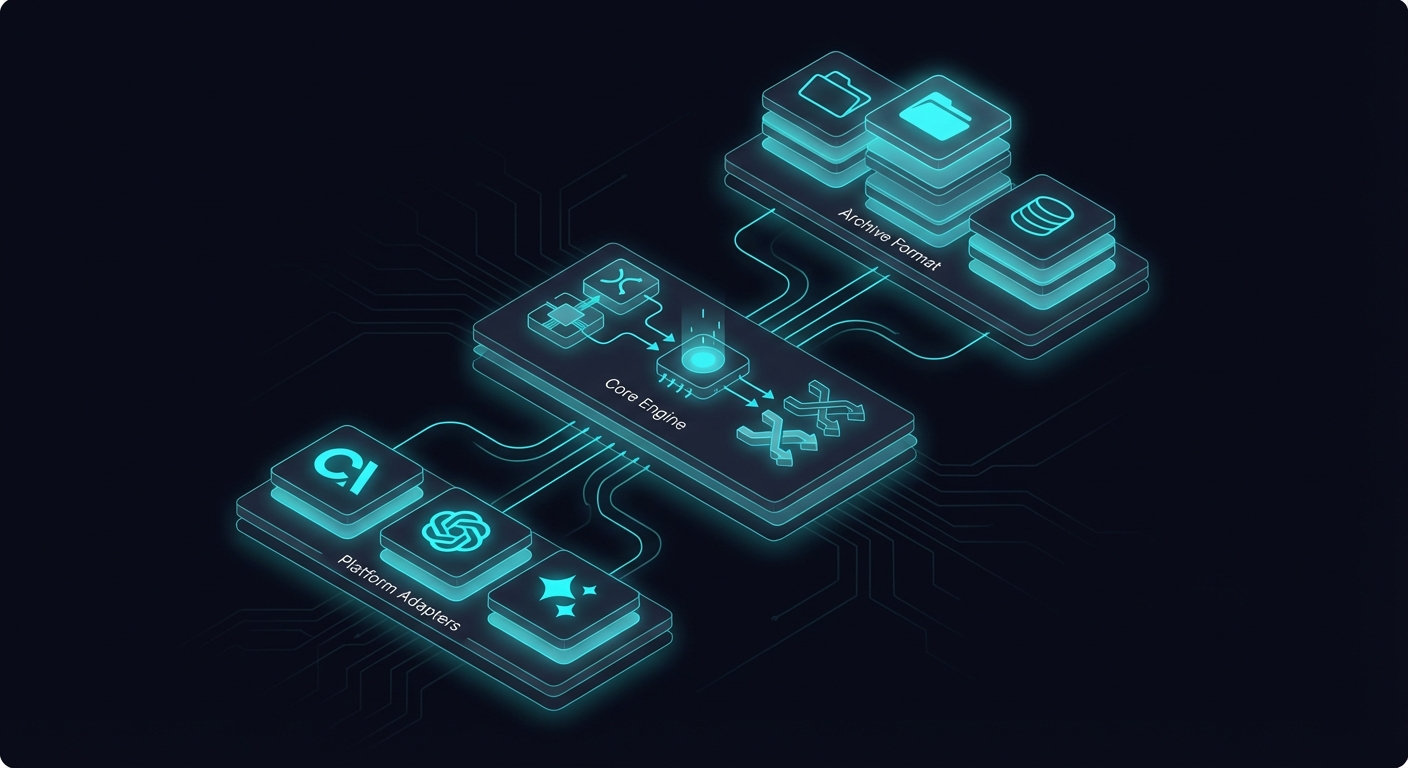
Architecture Overview
SaveState has four major layers:
┌─────────────────────────────────────────────────┐
│                  SaveState CLI                  │
│    init · snapshot · restore · list · diff      │
├─────────────────────────────────────────────────┤
│              Adapter Layer                      │
│   chatgpt · claude · gemini · openai · custom   │
├─────────────────────────────────────────────────┤
│              Encryption Layer                   │
│   AES-256-GCM · scrypt KDF · integrity check    │
├─────────────────────────────────────────────────┤
│              Storage Backends                   │
│   local · s3 · r2 · cloud API                   │
└─────────────────────────────────────────────────┘
Each layer has a single responsibility:
- CLI Layer: User interface, command parsing, orchestration
- Adapter Layer: Platform-specific data extraction and restoration
- Encryption Layer: Cryptographic operations, key derivation
- Storage Layer: Persisting encrypted snapshots
Let's examine each in detail.
The SaveState Archive Format (SAF)
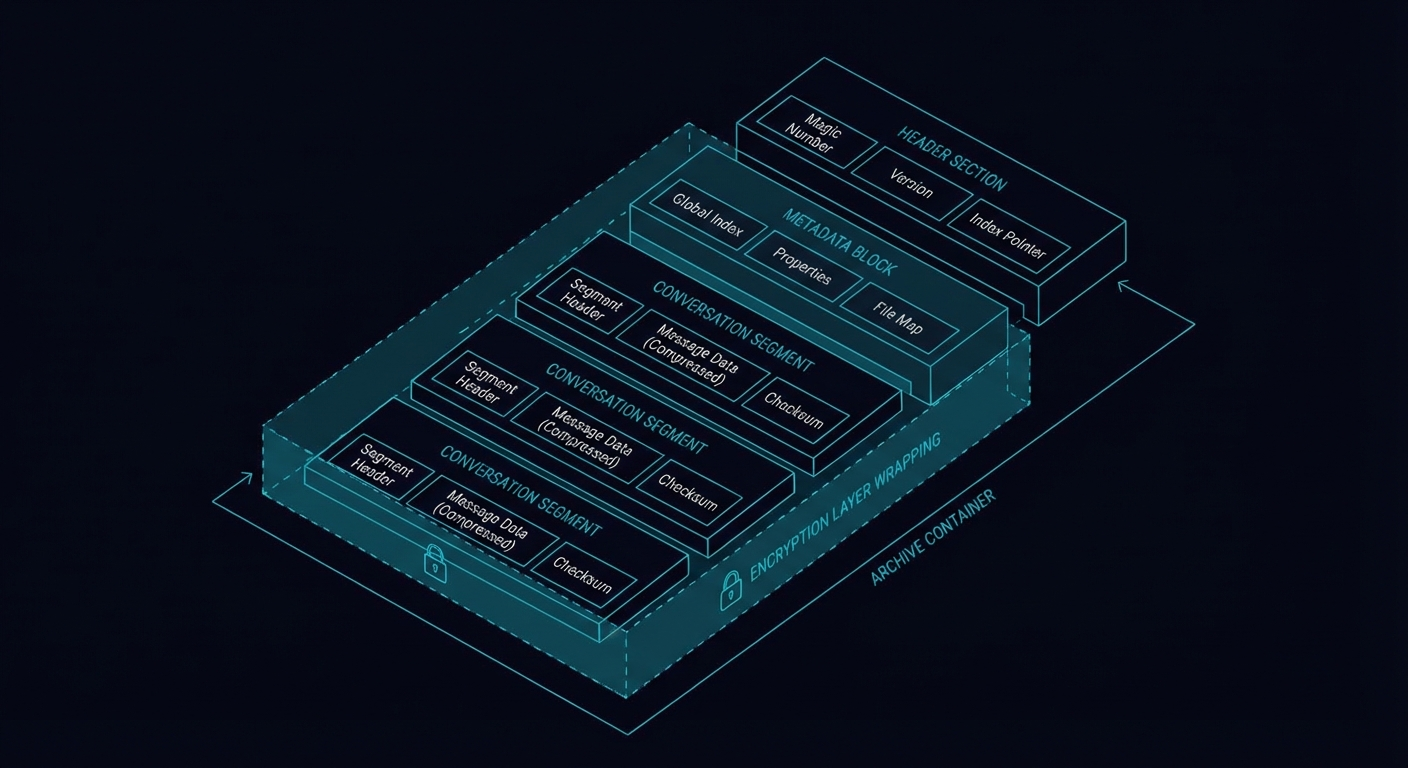
At the heart of SaveState is the SAF — an open specification for AI state archives.
Design Goals
When designing SAF, we optimized for:
- Portability — Must work across any AI platform
- Simplicity — Standard tools should be able to unpack it (after decryption)
- Extensibility — New platforms shouldn't require format changes
- Efficiency — Incremental snapshots should be cheap
File Structure
Each snapshot produces a .saf.enc file:
snapshot-2026-01-27T15-00-00Z.saf.encThe .enc suffix indicates encryption. After decryption, you get a gzipped tarball:
snapshot.saf.enc (encrypted envelope)
  └── snapshot.tar.gz (gzipped tarball)
       ├── manifest.json
       ├── identity/
       │   ├── personality.md
       │   ├── config.json
       │   └── tools.json
       ├── memory/
       │   ├── core.json
       │   └── knowledge/
       ├── conversations/
       │   ├── index.json
       │   └── threads/
       └── meta/
           ├── platform.json
           ├── snapshot-chain.json
           └── restore-hints.json
manifest.json
Every SAF archive starts with a manifest:
{
  "version": "1.0",
  "id": "ss-2026-01-27T15-00-00Z-a1b2c3",
  "timestamp": "2026-01-27T15:00:00.000Z",
  "platform": "chatgpt",
  "adapter": "chatgpt@0.2.1",
  "checksum": "sha256:abc123...",
  "incremental": false,
  "parent": null
}
The manifest provides metadata for the snapshot and enables integrity verification. The checksum covers the entire unpacked archive, allowing tamper detection even if the encryption layer is somehow bypassed.
identity/
The identity directory captures who your AI is:
personality.md — System prompts, custom instructions, SOUL files
# Custom Instructions

## What would you like ChatGPT to know about you?
I'm a software developer working primarily in TypeScript...

## How would you like ChatGPT to respond?
Be concise and technical. Skip the preamble...
config.json — Settings and preferences
{
  "model": "gpt-4o",
  "temperature": 0.7,
  "plugins": ["code-interpreter", "browsing"],
  "memory_enabled": true
}
memory/
The memory directory captures what your AI knows:
core.json — Platform memory entries
{
  "entries": [
    {
      "id": "mem_001",
      "content": "User prefers TypeScript over JavaScript",
      "created": "2026-01-15T10:30:00Z",
      "source": "conversation:abc123"
    },
    {
      "id": "mem_002",
      "content": "User is building a backup tool for AI agents",
      "created": "2026-01-20T14:15:00Z",
      "source": "explicit"
    }
  ]
}
knowledge/ — Uploaded documents, RAG sources. Larger files (PDFs, datasets, knowledge bases) are stored in the knowledge/ subdirectory with their metadata preserved.
Encryption: Zero-Knowledge by Design
SaveState's encryption ensures that your data is protected even if our servers (or any storage backend) are compromised.
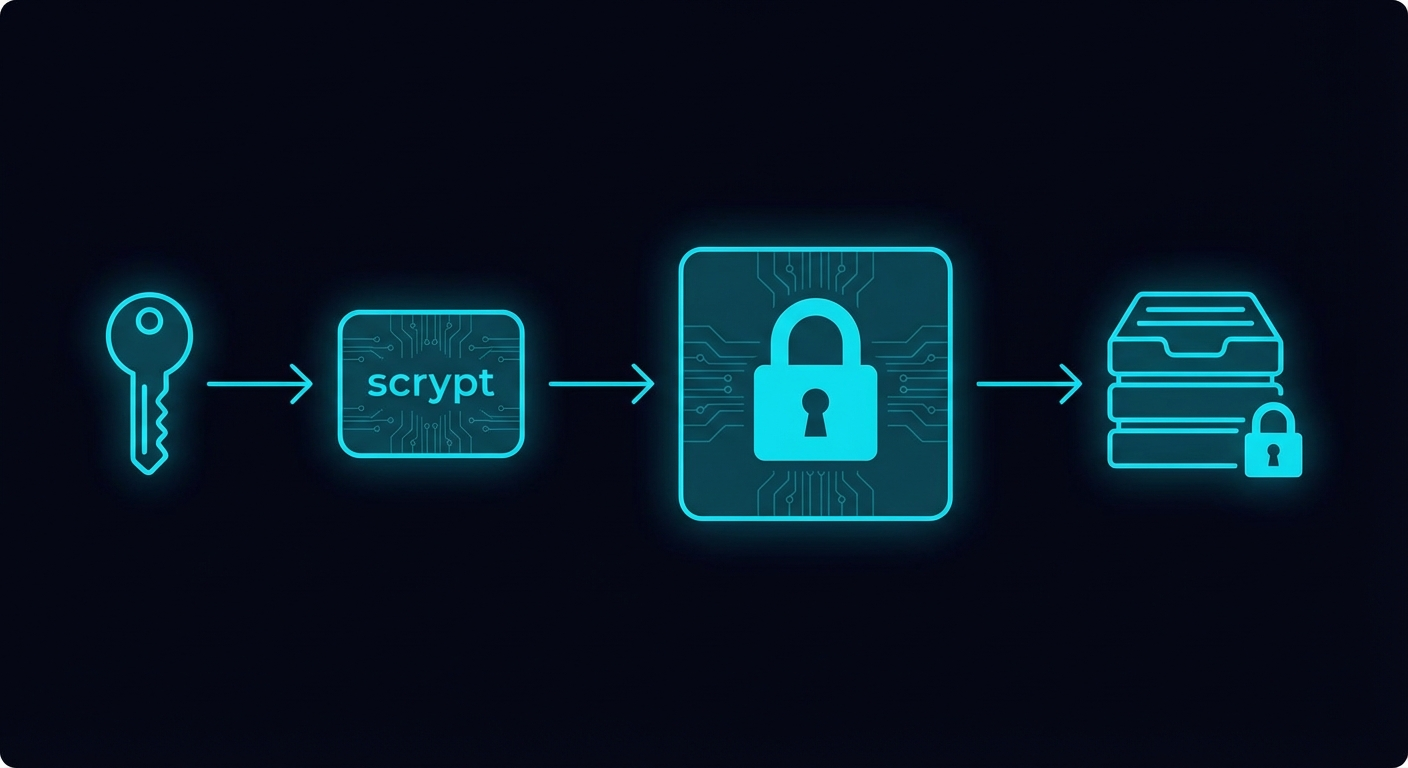
Key Derivation
We use scrypt for key derivation — a memory-hard function that resists GPU-based brute forcing:
User passphrase
    → scrypt (N=2^17, r=8, p=1, dkLen=32)
    → 256-bit AES key
Parameters explained:
- N=131072 (2^17) — CPU/memory cost parameter (high = harder to brute force)
- r=8 — Block size parameter
- p=1 — Parallelization parameter
- dkLen=32 — Output key length (256 bits)
These parameters are intentionally aggressive. Key derivation takes ~100ms on modern hardware, which is imperceptible to legitimate users but devastating to attackers trying billions of guesses.
Encryption
Once we have the key, we use AES-256-GCM:
Plaintext (tarball)
    → AES-256-GCM encrypt with:
        - 256-bit key (from scrypt)
        - 96-bit random IV (nonce)
    → Ciphertext + 128-bit auth tag
GCM (Galois/Counter Mode) provides both confidentiality and integrity:
- Confidentiality: Data is unreadable without the key
- Integrity: Any tampering is detected (auth tag verification fails)
File Format
The encrypted file structure:
┌──────────────────────────────────────────────────┐
│  Salt (32 bytes)                                 │
├──────────────────────────────────────────────────┤
│  IV/Nonce (12 bytes)                            │
├──────────────────────────────────────────────────┤
│  Ciphertext (variable length)                   │
├──────────────────────────────────────────────────┤
│  Auth Tag (16 bytes)                            │
└──────────────────────────────────────────────────┘
The salt is regenerated for each encryption, ensuring the same passphrase produces different keys for different files.
Implementation
Here's a simplified version of our encryption code:
import { scryptSync, randomBytes, createCipheriv, createDecipheriv } from 'crypto';

const SCRYPT_N = 2 ** 17;
const SCRYPT_R = 8;
const SCRYPT_P = 1;
const KEY_LENGTH = 32;
const IV_LENGTH = 12;
const SALT_LENGTH = 32;

export function encrypt(plaintext: Buffer, passphrase: string): Buffer {
  const salt = randomBytes(SALT_LENGTH);
  const key = scryptSync(passphrase, salt, KEY_LENGTH, {
    N: SCRYPT_N,
    r: SCRYPT_R,
    p: SCRYPT_P,
  });

  const iv = randomBytes(IV_LENGTH);
  const cipher = createCipheriv('aes-256-gcm', key, iv);

  const ciphertext = Buffer.concat([
    cipher.update(plaintext),
    cipher.final(),
  ]);

  const authTag = cipher.getAuthTag();

  return Buffer.concat([salt, iv, ciphertext, authTag]);
}
What This Means for You
- We never see your passphrase — It's never transmitted anywhere
- We can't read your backups — Even if you use our cloud storage
- Lost passphrase = lost data — There's no recovery mechanism (this is a feature, not a bug)
- Each file is independently encrypted — Compromising one doesn't help with others
The Adapter System
Adapters are SaveState's bridge to the AI platform ecosystem. Each adapter knows how to extract and restore state for a specific platform.
The Interface
Every adapter implements this TypeScript interface:
interface Adapter {
  // Identification
  readonly id: string;        // e.g., 'chatgpt'
  readonly name: string;      // e.g., 'ChatGPT'
  readonly platform: string;  // Platform family
  readonly version: string;   // Adapter version

  // Core operations
  detect(): Promise<boolean>;
  extract(): Promise<Snapshot>;
  restore(snapshot: Snapshot, options?: RestoreOptions): Promise<void>;
  identify(): Promise<PlatformMeta>;

  // Capabilities (optional)
  capabilities?: {
    extract: boolean;
    restore: boolean;
    partialRestore: boolean;
    incrementalExtract: boolean;
  };
}
Currently Supported
| Platform | Strategy |
|---|---|
| Clawdbot | Read SOUL.md, memory/ directory, conversations directly from filesystem |
| OpenAI Assistants | API calls to list assistants, threads, files, vector stores |
| ChatGPT | Parse data export JSON (conversations.json, memories, user_system_instructions) |
| Claude Web | Parse exported data + scrape Projects via authenticated session |
| Gemini | Google Takeout data + Gems API where available |
Building Your Own Adapter
Creating an adapter for a new platform is straightforward. Publish as @savestate/adapter-* on npm and SaveState will auto-discover it.

Storage Backends
SaveState separates "what to store" from "where to store it" through pluggable storage backends.
Available Backends
- Local Filesystem (default) — Snapshots in
.savestate/snapshots/ - S3-Compatible (R2, B2, Minio, etc.) — AWS Signature V4 with zero external dependencies
- SaveState Cloud API (Pro/Team) — Managed R2 bucket through authenticated API
Incremental Snapshots
Like git, SaveState only stores what changed between snapshots.
How It Works
- Hash everything — Each file in the snapshot gets a SHA-256 hash
- Compare to parent — Check which hashes differ from the previous snapshot
- Store deltas only — Unchanged files reference the parent snapshot
Space Savings
Real-world savings are significant:
| Snapshot | Type | Size | Full Equivalent | Savings |
|---|---|---|---|---|
| Day 1 | Full | 2.1 MB | 2.1 MB | 0% |
| Day 2 | Incremental | 47 KB | 2.2 MB | 98% |
| Day 3 | Incremental | 12 KB | 2.2 MB | 99% |
| Day 7 | Incremental | 89 KB | 2.4 MB | 96% |
Most changes are new conversations or memory updates. Identity, tools, and knowledge rarely change.

What's Next
SaveState's architecture is designed for extensibility. Here's what we're working on:
- Encrypted search index — Search across snapshots without decrypting everything
- Hardware key support — YubiKey, Touch ID via Secure Enclave
- Shamir's Secret Sharing — Split your passphrase across trusted parties
- Streaming encryption — Handle arbitrarily large snapshots
- Adapter SDK — Simplified adapter development with testing utilities
Conclusion
SaveState's architecture reflects our core belief: your data should be yours.
- Open format — SAF is documented, standard tools work with it
- Strong encryption — AES-256-GCM with scrypt, keys you control
- Pluggable adapters — Any platform can be supported
- Flexible storage — Store anywhere, we never see your data
We've tried to make the right choices for security and portability, even when they made implementation harder. Because when it comes to your AI identity, there's no room for shortcuts.
Ready to protect your AI identity?
Pro is $9/month. Encrypted portable memory. Card today. No waitlist.
Subscribe to Pro — $9/mo Team is $29/monthAfter you pay, your API key is emailed. Then savestate login. Card today — no waitlist.
npm install -g @savestate/cli
savestate init
savestate snapshot